

Pandigital Novel Review
Overview
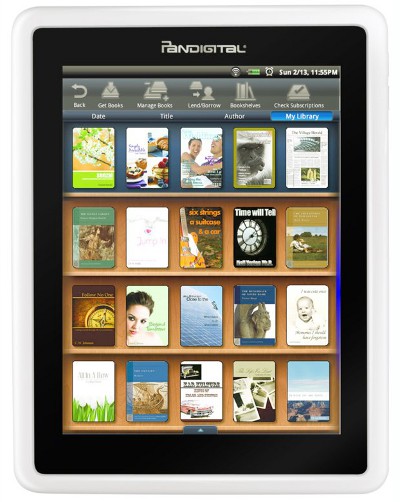
Pandigital, known for their digital photo frames and scanners, has decided to jump into the ereader fray with the Pandigital Novel, a 7-inch multipurpose ereader with an LCD touchscreen, Wi-Fi, and an Android operating system.
The Pandigital Novel shares the same internal hardware as the Cruz Reader and the PocketBook IQ, with the exception that the IQ has some extra hardware buttons. All are designed to be ereaders and multimedia devices capable of browsing the web, playing music, sending email, and displaying videos and images on their 800 x 600 resolution screens.
Update: This review was written right at the Pandigital Novel's release and since then the device has gotten some firmware updates to improve and expand its functionality. I've updated the review in parts to make it more accurate to the Novel's current feature-set, but you may want to check the 9" Pandigital Novel review because both devices are very similar and that review is much more recent.
Also, the Pandigital Novels are now open to install 3rd-party Android apps, including the Kobo, Aldiko, and Amazon Kindle ereading apps, among many others. It can be a little hard to learn where to find apps in the beginning when first starting with Android, so check this article to learn how to find and install Android apps.
Features and Functions
First off, the touchscreen takes some getting used to. The sensitivity and accuracy when using your fingers could be better. Once I started using a stylus I found the touchscreen works great, the quickness in which it responses still needs some improving but it works quite well, even tiny links are easy to activate when using the web browser. A long fingernail can get the job done too; it just requires a hard tap.
The screen technology is digital TFT LCD, and the quality is decent but not great. The light seems to glitter, especially white; it's not solid color. It looks better further away than close-up, or dimmed slightly.
The Pandigital Novel's claim to ereading fame is its integration with Barnes and Noble's store for ebooks, magazines, and newspapers.
It also comes with a built-in email application, web browser, alarm clock, calendar, games, and dictionary.
There's a 2-in-1 memory card slot for SD and MMC cards up to 32GB, and it comes with 1GB internal memory. There's an orientation sensor, mini USB port, stereo speakers, headphone jack, and a battery that lasts up to six hours in reading mode.
Now that Pandigital has opened up the Pandigital Novel to install apps, it is much more versatile and can do all kinds of things. There's no app market for the Novel, but there is a hack to add it. Or you can install other app markets on it such as SlideMe, if you're not into hacking.
The Pandigital Novel as an eReader
The Novel's ebook reader offers some good features but lacks any customizing options, no way to set margins, change font type, or customize font or background color. Hyperlinks in ebooks don't work. The brightness can only be adjusted in the main settings menu and tends to reset sporadically.
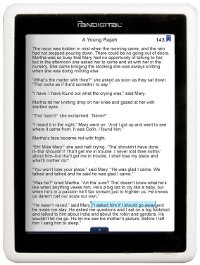
There are some good features like adding notes, highlights, bookmarks, and accessing the dictionary. Since hyperlinks don't work in the book's TOC, there's one built-in to the bookmarks menu that works effectively. A night reading mode turns the background black and the text white, and there are 4 font sizes.
The Pandigital Novel supports just two ebook formats: EPUB and PDF, non DRM and B&N DRM. There's a second app for adding authorized Adobe DRM ebooks, and of course you can install other reading apps for more formats. You can even use the Overdrive Android app for borrowing library ebooks.
It can download free EBUB and PDF ebooks directly from free ebook websites like Project Gutenberg and Feedbooks. If you have a memory card installed you have to select import SD card to get them to show up in the library, as it automatically saves to the card if installed.
I downloaded all of Mary Robinette Kowal's short stories from Feedbooks and read them on the Pandigital Novel. At first I didn't care for the screen, but then I turned the brightness down to about 1/3 and enjoyed reading on it well enough (the good stories helped). E Ink is still the way to go for hardcore reading though.
PDF functionality is basic. Color for comics and other visual PDFs is nice, but there's no zoom and text size options can be odd and unpredictable. So installing other apps for these is a must.
Overall, reading is what you'd expect with an LCD screen. Works good indoors but not so good outdoors. Being able to dim the brightness helps with the glittery quality of the screen..
Pandigital Novel Video Review
B&N's eBooks Store
For B&N's ebooks it shows book covers, but not for side-loaded content. I tried one of B&N's digital newspapers that I had from reviewing the Nook. It worked, but I tried one of the magazines and it wouldn't work for some reason.
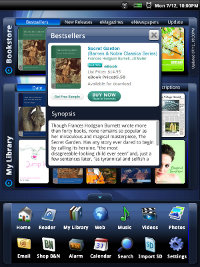
The actual shopping from B&N's ebook store doesn't seem to be very well thought out. There's a widget at the top of the homescreen that shows a list of the bestsellers, new releases, newspapers and magazines. It lists the top 50 or so, 5 at a time, and there's no way to run searches from here.
Clicking the shop icon opens the browser and takes you to B&N's main site. The problem is that it is not optimized for a mobile browser or a 7-inch screen and takes long to load and requires patience to run searches and constantly scroll through pages.
Once you buy an ebook it doesn't automatically go to your library. You have go in to the "library app" of the Novel and then sign in again to B&N and select the ebook from the list and then download it from there.
Web Browser
Wi-Fi is easy to set up. It scans for networks and then you need to enter the password the first time. The internet automatically connects when you tap the browser and when you turn the device on. Or you can set it to stay off if you want to save on battery life.
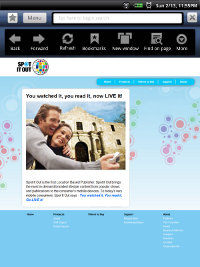
The browser has a menu that brings up bookmarks, there's a forward and back button, refresh, search, and a settings menu. There are settings options for layout, text size, landscape mode, Javascript, cookies, privacy settings, and others.
The browser can open in multiple windows but there are no tabs. There's also a recent history list given for each site visited by tapping the url.
The browser works fairly well. It's main drawback is that it loads slow and scrolling is jerky. Zooming in and out is a little tricky too, but works good after some getting used to it. Its default setting fits the webpage to the screen, so there's no left and right scrolling. I'd recommend installing the Dolphin browser instead; it works better and has a lot of features.
The browser can download any of the formats that the Pandigital Novel supports (listed below). If a memory card is installed the download generally goes there, so it will need to be imported by tapping the icon.
Video Functions
The Pandigital Novel supports MPEG4 video format. Unfortunately the browser doesn't support Flash so video websites like Hulu are out.
I tested some videos and they worked well enough but jerked a bit during play. It seems to drop a few frames with most videos.
The picture quality is pretty good for such a small screen. The device also comes with a little stand that works well for watching videos and slideshows in landscape orientation.
You can also install this YouTube app that I found; most don't work but this older version gets the job done.
Pictures
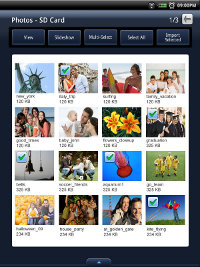
Given Pandigital's background, it's no surprise that the Novel also doubles as a photo frame/viewer. It supports JPEG, PNG, GIF, and BMP image files.
There's a slideshow feature with a number of different settings for speed adjustment, playlists, and adding music.
Music and Audio
There's a built-in audio player that supports MP3, WMA, and AAC formats. Two speakers and a headphone jack are located on the bottom edge of the device. The volume buttons are on the right side. The speakers sound about as good as you'd expect—they get the job done and they are louder than most ereaders.
Audio functions include setting playlists, shuffle, and repeat. Sort by title or artist. Minimize the audio menu to keep listening while doing other tasks.
Bottom Line
The Pandigital Novel is an ereader combined with an Android tablet. While it isn't particularly proficient at either, for the price it's enough to attract a wide audience.
The fact that it combines so many different elements into one gives it an edge, playing video, reading, internet, email, etc. And being tied in with Barnes and Noble is going to do a lot for its image (pardon the pun).
Overall, the white Pandigital Novel is an okay budget 7" Android tablet and ereader combination if you don't want to spend the money on something like the Nook Color or Samsung Galaxy Tab, but you'd be better off spending more money. There are a lot of options to choose from nowadays, so it's important to figure out exactly what features in a color ereader are most important to you.
Tech Specs
- 7-inch Digital TFT LCD touchscreen.
- 800 x 600 pixel resolution.
- Android 2.0 operating system.
- ARM processor.
- Supports PDF, EPUB, HTML, MP3, AAC, WAV, JPEG, BMP, PNG, GIF, MPEG4.
- 1 GB memory; SD/SDHC, MMC/MMC+ up to 32GB.
- Built-in web browser, calendar, dictionary, email, music and video players.
- Wi-Fi 802.11 a/b/g/n.
- Dimensions: 5.5" x 7.5" x .5".
- Weight: 19 ounces.
- Battery: 6-7 hours for reading.
- Audio: 2.5mm headphone jack, speakers.


